GS1 DataMatrix, DataBar and Digital Link
Decode and Validate
GS1 Barcodes
100% Offline
QRectly decodes GS1 DataMatrix, DataBar, and Digital Link codes directly on your iPhone, without an internet connection. Your scan data never leaves your device, ensuring complete privacy and strict GDPR compliance.
See What a GS1 Barcode Actually Contains
GS1 barcodes use Application Identifiers (AIs) to structure encoded data. QRectly decodes these identifiers and displays all encoded values with clear labels in a human-friendly format.
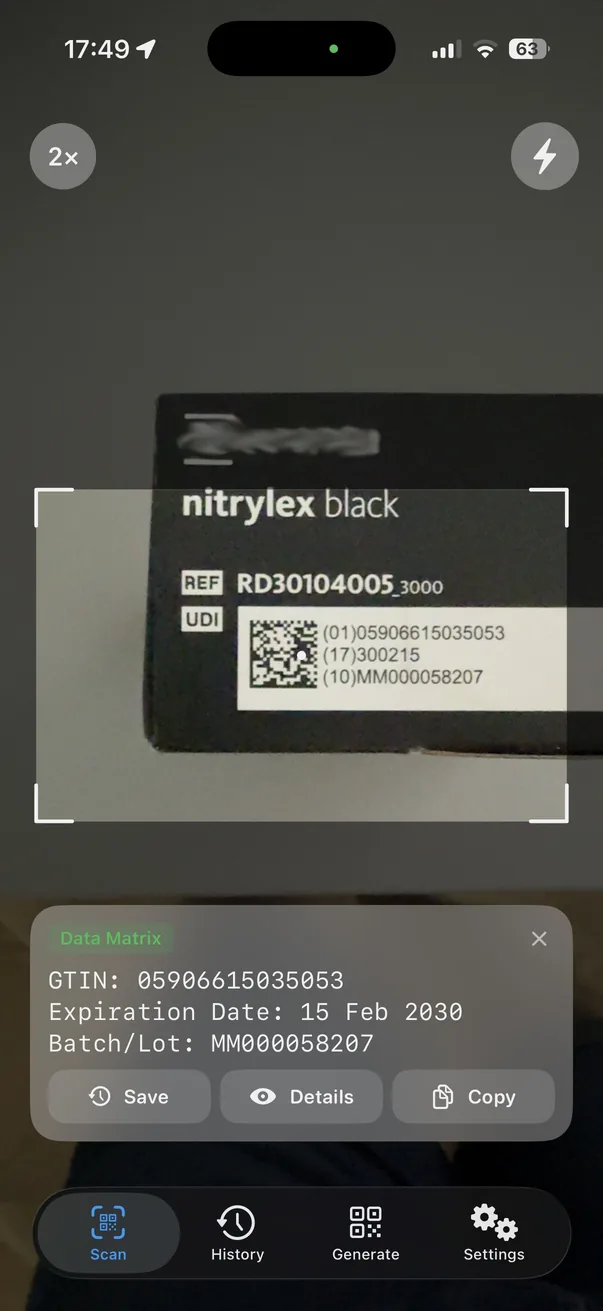
Preview at the point of scanning
After the code is scanned, the app shows a quick preview of the decoded fields, such as the GTIN, expiration date, and batch or lot number.
From there, you can save the scanned data, open the full view to see all available fields, inspect the raw code, or copy the data to the clipboard.
Full record on the details screen
The Code Details view shows all structured data elements separately, so you can copy or analyze them as needed. Dates stored in YYMMDD format are converted into a readable date.
- (01)
- GTIN — the 14-digit Global Trade Item Number
- (10)
- Batch or lot number, variable length
- (17)
- Expiration date, encoded as YYMMDD
- (21)
- Serial number, for unit-level traceability
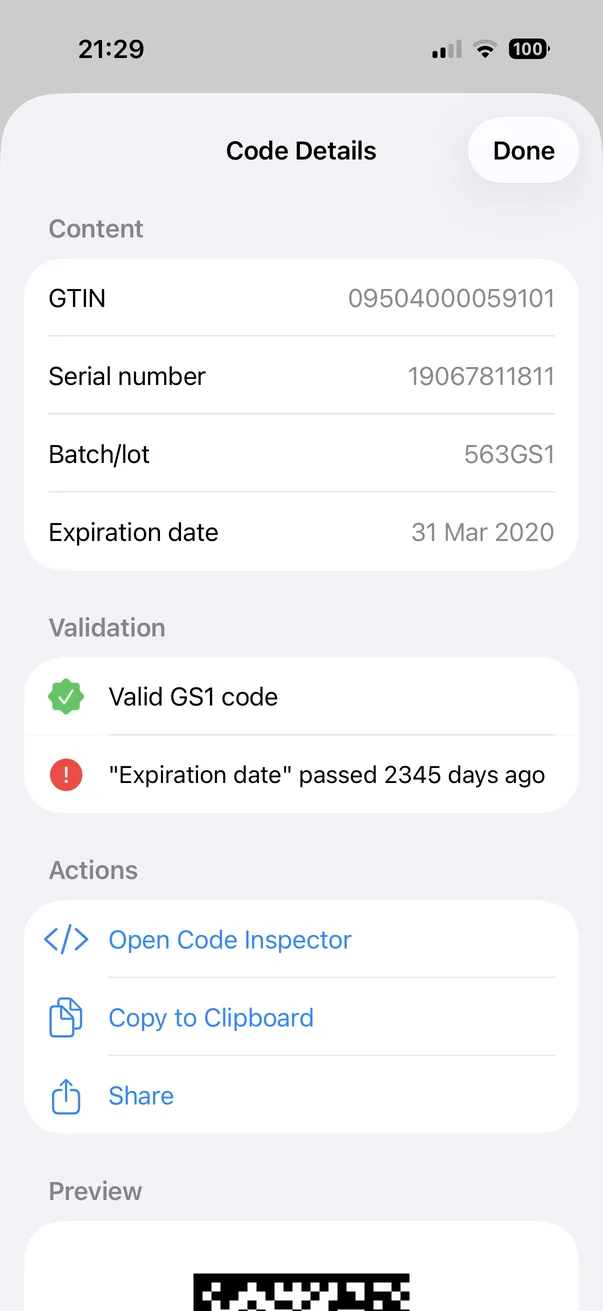
Validate and Catch Expired Dates and Wrong Values
Even if the structured data elements are decoded correctly, they may still contain invalid data. QRectly checks more than just checksums. It also verifies the structure of the element strings and the dates they contain, and reports all detected errors and warnings.
Valid GS1 code
The element strings parse and the GTIN check digit matches.
Expiration date has passed
Reported with the number of days elapsed since the date.
The production date is set to a future date
Usually a mis-keyed date or a mislabelled batch.
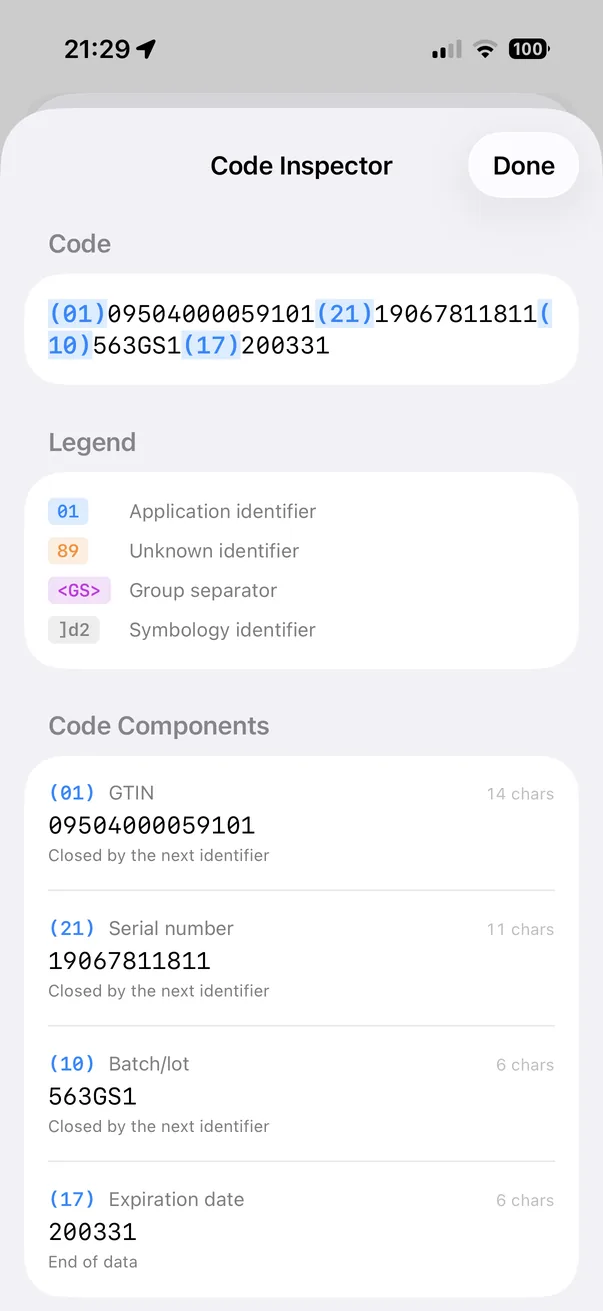
Inspect the Raw GS1 Data
The Code Inspector displays the raw code string exactly as it was encoded, with each Application Identifier highlighted at its position. For all code components, you can see the character count and how the component ended: with the next identifier, a group separator, or the end of the data.
You can use this information to diagnose codes rejected by other scanners. It can help you identify problems such as a missing separator after a variable-length field or an Application Identifier that the encoder should not have included.
- Recognised application identifiers are shown with their field names
- Unrecognised identifiers remain visible and are explicitly marked
- Group Separators (GS) and symbology identifiers are preserved at their original positions
- Each component shows its character count and how it was closed
Supported Symbologies and Data Formats
GS1 defines the data syntax; the symbology is the carrier that holds it. QRectly reads both the GS1 carriers below and the general-purpose symbologies alongside them.
GS1 carriers
- GS1 DataMatrix
- GS1 DataBar
- GS1 DataBar Expanded
- GS1 Digital Link (URI syntax)
- HIBC (Health Industry Bar Code)
2D symbologies
- QR Code
- Micro QR Code
- rMQR
- Data Matrix
- Aztec
- PDF417
1D symbologies
- EAN-13 and EAN-8
- UPC-A and UPC-E
- Code 128
- Code 39
- ITF
- Codabar
GS1 Application Identifiers Stored in the App
QRectly stores all Application Identifiers defined in the GS1 General Specifications within the app itself. It can therefore decode GS1 data values without an internet connection.
- (01)
- GTIN, 14 digits, check digit verified
- (10)
- Batch or lot number, variable length
- (17)
- Expiration date, YYMMDD, checked against today
- (21)
- Serial number, variable length
Identifiers outside the recognised set are preserved and marked as unknown in the Code Inspector rather than discarded, together with any group separators and symbology identifier the symbol carried.
100% Offline & GDPR-Compliant
QRectly is 100% GDPR compliant and does not collect or send any data. It works fully offline and does not require an internet connection, including when Airplane Mode is enabled.
No internet required
The Application Identifier tables are included with the app and are not downloaded from external servers.
No data transmitted
Everything you scan and decode stays on your device. The app does not collect analytics or send your data to third-party services.
CSV export
Scans can include a note and status and can be exported to a CSV file for use with other tools or software.
Read a GS1 code with an iPhone
Under 5 MB. No account, no setup, no connection required.
View on the App Store